

How to Organize Your Office Desk So You Stop Losing Time to the Mess
A cluttered desk quietly costs close to half an hour a day, spent looking for a pen that works, fishing a charging cable out of a tangle, and clearing a spot just big enough for a coffee cup. The fix is not a fancy organizer system. It was a one afternoon reset that gave every item one home and pulled everything I do not use weekly off the desktop. Here is the exact step by step routine that cleared my surface for good and the daily habit that kept it that way.
Jump to a section
- What you'll need
- Step-by-step
- Clear the entire desk first so you can actually see what you own
- Wipe down the desktop, monitor, keyboard, and lamp while the surface is empty
- Sort every item into keep on the desk, keep nearby, and donate or trash
- Deal with the paper pile by handling each sheet only once
- Tame the cable mess under and behind the desk
- Give every desktop item a single defined home and use a tray to enforce it
- Pro tips
- FAQ
What You'll Need
Step-by-Step Instructions
Clear the entire desk first so you can actually see what you own
Before you sort anything or buy a single organizer, take everything off the desk and put it on the floor or a nearby table, including the monitor base, the lamp, the pen cup, the loose papers, the cables, and the coffee mug you forgot was there. This sounds excessive for what should be a quick tidy, but it is the single most important step, because the only way to know what truly belongs on your desk is to start from a completely empty surface and put back only what earns its spot. A desk that gets sorted in place stays cluttered, because you keep working around the same piles you have been working around for months and you never actually decide whether each thing deserves to be there. An empty desk also lets you wipe the entire surface for the first time in probably much longer than you want to admit, and a clean surface immediately changes how you feel about sitting down at it. Plan thirty to sixty minutes for this reset; trying to squeeze it into ten minutes is why most desk cleanups never stick. Work with a real trash bag and a recycling bag in arm's reach, because half of what is on a typical desk is paper you no longer need.
Wipe down the desktop, monitor, keyboard, and lamp while the surface is empty
The empty desk is a rare chance to clean parts you almost never reach, so take ten minutes and do them all now rather than putting things back over the same dust film. Wipe the desktop with a microfiber cloth lightly dampened with all-purpose cleaner, paying attention to the back edge against the wall and the corners under where the monitor base sat, both of which collect a surprising layer of dust and crumbs. Use a screen-safe cleaner on the monitor and a barely damp microfiber on the keyboard, then flip the keyboard upside down over the trash can and tap it firmly to dump out the crumbs and hair lodged between the keys. Wipe the lamp base, the lamp stem, and the bulb housing while the lamp is cool and unplugged, because dust on a lamp visibly dims the light you read and work by. A clean keyboard and a clean screen change how the workspace looks more than any new accessory you could buy, and doing them now while the desk is empty takes a fraction of the time it takes when you have to work around everything. The 12 genius rubbing alcohol cleaning hacks guide has the safe-for-electronics screen and keyboard methods covered in detail.
Sort every item into keep on the desk, keep nearby, and donate or trash
Now go through the pile you took off the desk one item at a time and put each one into one of three groups: things you use every single workday, things you use occasionally but want within reach, and things you have not used in months and do not actually need. The first group is the only group that earns a spot on the desktop. The second group goes into a drawer or onto a shelf within arm's reach. The third group goes into the donation box, the trash, or the recycling, because every item you have not used in months is taking up the most expensive real estate in your work life, which is the surface in front of you. Be honest about the difference between a tool you use and a tool you imagine you might use; the unused stapler, the second mouse pad, the decorative figurine you stopped noticing five years ago, none of these earn the desk. The rule of thumb that worked best for me was, if I had not touched it in the past two weeks, it did not go back on the desktop, no matter how much I felt I might need it. You can always pull something back out of the drawer if you find you actually do use it, but starting strict and relaxing is far easier than starting loose and trying to tighten back up.
Deal with the paper pile by handling each sheet only once
Paper is the category that quietly takes over most desks, so handle it as its own pass rather than letting it sit in the keep pile. Go through every loose sheet and make one of four decisions for each one, in the moment, without setting it aside for later: act on it now if it takes under two minutes, file it if you need to keep it, scan it with your phone and recycle the original if a digital copy is enough, or recycle it outright. The single biggest reason paper piles grow is that we pick up a sheet, decide we are not sure what to do with it, and put it back down on the desk, which is how the same piece of paper gets handled forty times before it ever leaves. Handling each sheet exactly once breaks that cycle. Set up a small vertical file holder or a letter tray with three slots, inbox for new mail, action for things you need to do this week, and reference for things you need to keep, so that the small percentage of paper you do keep has a defined home rather than ending up back on the desktop. The how to declutter your room post applies the same single-touch rule to clothes and clutter elsewhere in the house and is worth reading if paper is not your only weak spot.
Tame the cable mess under and behind the desk
Cables are the second biggest source of desk frustration and the most ignored, because you cannot fix them by tidying the surface above. Pull the desk away from the wall a few inches or sit underneath it with a flashlight and look at what is actually back there: a tangle of power cords, monitor cables, charging cables for devices you no longer own, and a power strip overflowing with everything plugged into everything. Unplug each cable one at a time and identify what it goes to; any cable that connects to nothing or to a device you no longer use gets coiled and put in a drawer, or recycled if you will never use it again. Bundle the cables that remain with velcro straps or cable ties, route them down the same path so they run parallel rather than crossing, and mount the power strip to the underside of the desk or to a leg with adhesive strips so it is up off the floor. A simple cable tray or a small basket zip-tied under the desk takes thirty minutes to install and removes the entire visual chaos under the desk in one move. Label the plug ends of cables you frequently unplug, like the laptop charger and the phone cable, with a small piece of masking tape and a marker, so you never again pull the wrong plug and accidentally power off the wrong device.
Give every desktop item a single defined home and use a tray to enforce it
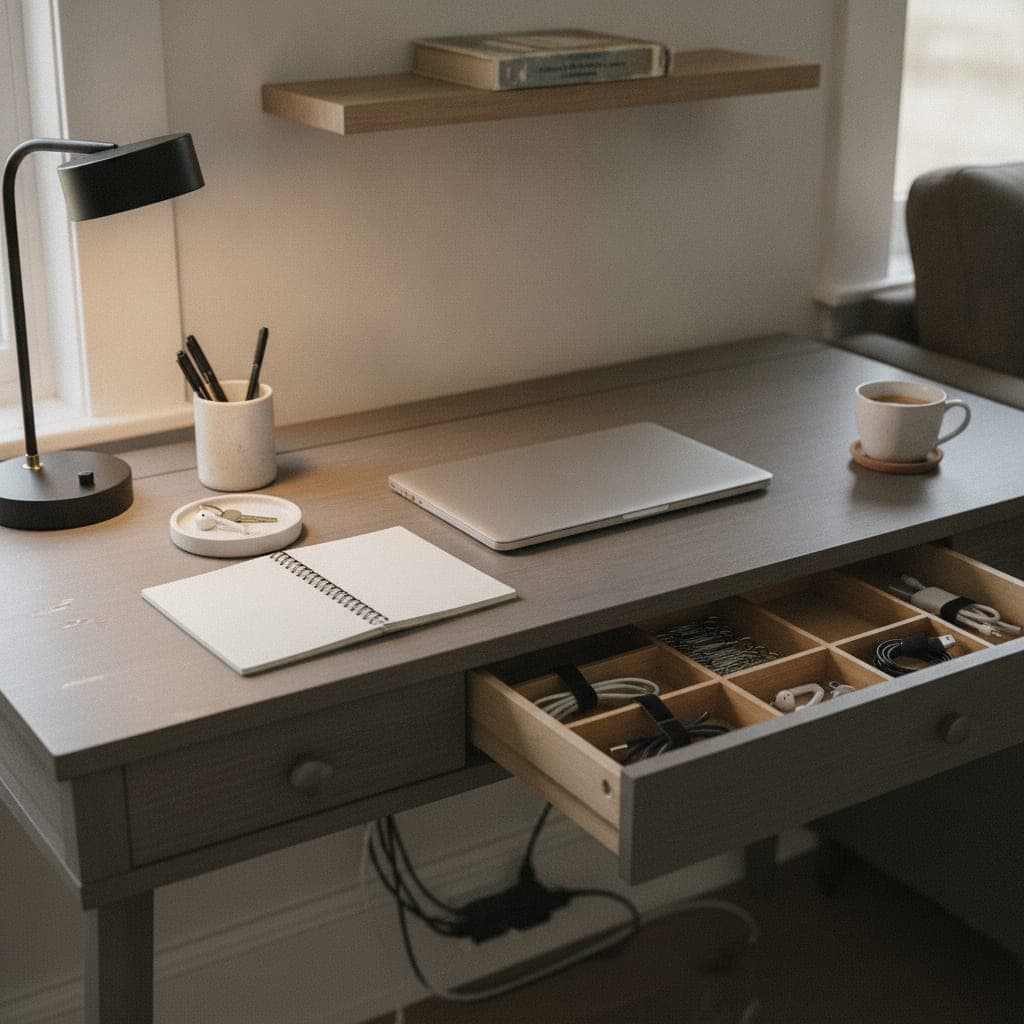
The principle that keeps a desk organized long term is that every item has one specific place it lives, and you put it back there every single time, with no exceptions. Things that float around the desktop because they have no defined spot are exactly what creates clutter, even when none of those things are individually messy. Pick a fixed home for the things that stayed on the desk: the keyboard at a consistent distance from the edge, the mouse pad in a consistent spot to the right of it (or left for left handed work), the monitor centered, the lamp in a consistent corner, the pen cup in a consistent spot, the notebook in a consistent spot. Use a small tray or a flat catchall to define a single zone for the small loose items that otherwise scatter, your wallet, keys, phone, headphones, lip balm; the tray creates an actual boundary that makes clutter immediately visible because anything outside the tray now looks wrong. Without the tray, the same items quietly spread across the surface and the spread feels normal. With it, you put them back inside the tray every time and the desk stays clear because the tray contains the only kind of mess that desks really accumulate.
Organize the drawer with a divider tray so the inside does not become a junk drawer
The top desk drawer is where most desktop clutter is supposed to go, but it almost always becomes worse than the desktop because there is no internal structure. A single rectangular drawer with pens, paper clips, cords, tape, and gum all tossed in together is functionally useless, because you spend longer digging through it than you used to spend looking around the desktop. A simple plastic drawer organizer tray with several compartments fixes this in five minutes. Put pens in one compartment, paper clips and binder clips in another, tape and a small pair of scissors in another, charging cables coiled in another, sticky notes in another. Give every small item exactly one compartment that is roughly its size, and resist the temptation to mix unrelated items into the same slot, because the moment two unrelated things share a compartment, that compartment becomes a miniature junk drawer. The drawer organizer is the single accessory I would recommend buying for a desk reset; almost everything else can be repurposed from things you already own.
Pull the secondary stuff up off the desk and onto a wall, shelf, or hutch
If your desk still feels crowded after the sort and the drawer organizer, the answer is to move things up rather than to buy a bigger desk. A small shelf, a wall mounted pegboard, a monitor stand with storage underneath, or a hutch above the desk all turn dead vertical space into useful storage and pull the secondary items, reference books, notebooks, the printer, a desk plant, a small file box, off the work surface entirely. The principle is that the desktop itself should hold only the things you actively use while sitting at the desk; everything else should be within reach but not on the surface. Mount a small shelf at eye level above the back of the desk for the books and notebooks you reference but do not work in directly, and put the printer on a separate side table or shelf rather than on the desk. Even a monitor riser raises the screen to a healthier eye height and creates storage underneath it for the keyboard when not in use, which doubles the apparent surface area of a small desk. Vertical thinking is the easiest way to shrink a cluttered desk without giving anything up.
Do a one minute end of day reset so the desk starts every morning clean
The single habit that keeps a desk clean for the long term is a one minute reset at the end of every workday, before you stand up to leave. Put the pens back in the cup, slide the notebook into its spot, drop the loose small items into the tray, throw any trash into the bin, file or recycle the paper you handled that day, and shut down or sleep the computer. This takes under sixty seconds when you do it daily and is genuinely the difference between a desk that stays clean for months and a desk that drifts back into chaos within a week. The reason it works is that one day of small mess is easy to undo, but ten days of small mess is a project, and a desk left chaotic at the end of one day is much harder to start clean at the next day. The morning version of you sitting down to a fresh desk will thank the evening version of you every single day. Combine this with our ultimate weekly cleaning schedule for the rest of the home and you keep both your physical and digital workspaces from ever piling up.
What actually fixed the desk and what kept it that way
Two changes did almost all of the work in turning a chronically messy desk into one that stayed clean for months. The first was clearing the entire surface and being honest about which items actually earned their spot, which removed more than half of what had been on the desk for years and immediately made the room feel larger. The second was the small catchall tray for loose items, because almost every reaccumulation of desktop clutter I had ever experienced was the same handful of items, wallet, keys, headphones, lip balm, randomly placed every day; once the tray defined a single zone for those items, the desktop simply stopped accumulating them. The drawer organizer was the third highest impact change, because the top drawer had been the worst part of the desk for years and a five dollar tray fixed it permanently. The cable cleanup made the biggest visual difference because the rat's nest under the desk had been the largest hidden source of visual stress, and bundling and lifting the cables off the floor was a one time effort that paid back every time I sat down. The daily one minute reset was the habit that made all of it stick. If you do only one thing, get a tray for the loose items and start using it today; that alone removes the most common source of desk clutter even if you do nothing else.
Mistakes that put the clutter right back within weeks
Mistake one: trying to organize the desk in place without clearing it first. You end up shuffling the same piles around and keeping things you would have thrown out if you had actually held each one in your hand on its own. Mistake two: buying organizers before sorting. Walking into the container store before you know what you actually own leads to bins that do not fit your stuff and a desk that looks organized for a week and then collapses because the new bins were never the right answer. Sort first, buy organizers only for what is left. Mistake three: not addressing cables. A clean desktop above a cable nightmare under the desk still feels chaotic every time you have to plug something in, and the chaos creeps back upward over time. Mistake four: skipping the end of day reset. The desk that stays clean for one week and then slowly drifts back to its old state is the desk where the daily reset was never adopted; without it, even a perfect organization system slowly loses to entropy. Mistake five: keeping the unused thing because you might need it. Almost nothing on a desk you have not used in months is something you will actually need; if you do, you can buy another or pull it back out of a labeled box in the closet. The cost of keeping it on the desk is paid every single day.
Pro Tips
- Clear the entire desk before you sort or buy anything. A desk reorganized in place keeps the same piles you have been working around for months.
- Use a small catchall tray for the loose items that always scatter, wallet, keys, headphones. The tray creates a visible boundary so clutter no longer feels normal.
- Do a sixty second end of day reset before you stand up. One day of small mess is easy to undo; ten days of it is a full project.
Frequently Asked Questions
How do I organize my office desk if I have very little space?
On a small desk, the answer is to move things up rather than out. Use a monitor riser to lift the screen and create storage underneath it for the keyboard, mount a small shelf or pegboard on the wall above the desk for books and notebooks, and move the printer to a separate side table. Only items you actively use while sitting at the desk should stay on the work surface; everything else should be within reach but off the desktop. A small drawer organizer and a single catchall tray for loose items do more for a tiny desk than any large filing system.
How do I keep my desk organized long term?
The single habit that keeps a desk clean for the long term is a one minute end of day reset before you stand up. Put pens back in the cup, drop loose items into the catchall tray, file or recycle the paper you handled that day, and clear the surface for tomorrow. One day of small mess takes under a minute to undo, but ten days of it becomes a full project, which is why most desks slowly drift back into clutter without the daily reset. Pair the reset with the rule that every item has one defined home and goes back to that home every time.
What should I keep on top of my desk and what should go in a drawer?
Keep only the items you use every workday on the desktop: keyboard, mouse, monitor, lamp, pen cup, current notebook, and a small catchall tray for loose items. Anything you use occasionally but want within reach goes in a drawer, ideally a top drawer with a divider tray that gives every small item its own compartment, pens, paper clips, tape, charging cables, sticky notes. Anything you have not used in months should leave the desk entirely, either to a labeled box on a shelf or to donation, because items that have not been touched in months are taking up the most expensive real estate in your work life.
How do I deal with cable clutter under my desk?
Pull the desk away from the wall and unplug every cable one at a time so you can identify what it actually connects to, then recycle or store any cable that goes to a device you no longer own. Bundle the remaining cables with velcro straps or cable ties so they run parallel rather than crossing, and mount the power strip to the underside of the desk with adhesive strips so it is up off the floor. Label the plug ends of cables you frequently unplug, like the laptop charger and the phone cable, so you never pull the wrong plug. A simple cable tray or basket under the desk removes the entire visual chaos in one move.
How this guide was made
This Deep Clean guide was researched, written, edited, and published by Fredler Pierre-Louis. The 11 steps below are built around Two empty boxes or laundry baskets, Trash bag and a recycling bag and Microfiber cloth and a screen-safe cleaner, and the quantities and dwell times come from published cleaning-chemistry and manufacturer guidance for those materials, not from a controlled trial we ran ourselves. Where a popular version of this hack does not work, or is risky on a particular surface, this 10 min guide says so.
- Checked against manufacturer and materials guidance for the surfaces named.
- Reviewed by a person for chemical safety and surface compatibility before publication.
- Written to explain why a method works, not just to list steps.
- Corrected whenever a reader reports an error or an edge case we missed.
Read our full editorial policy or learn more about the team behind TryCleaningHacks.
Related Cleaning Guides
Safety Notes
- Unplug the lamp and any powered desk accessories before wiping the housings or sockets, and let bulbs cool fully before touching them.
- Use only a screen-safe cleaner on monitors and laptops, and always spray onto the cloth rather than directly onto the screen, because liquid wicking behind the bezel damages the display.
- Keep cable ties and small organizer parts away from young children and pets, since cords and small plastic pieces are choking and strangulation hazards.
You might also like
7 Deep Cleaning Tricks That Save Hours Every Week
Most of the time spent cleaning a bathroom is spent waiting or backtracking, not scrubbing. Spraying one surface, waiting for it, wiping it, then starting the next one means you pay every dwell time separately. Batching those dwell times so every cleaner works at once is the single change that cuts the job roughly in half. None of this involves a gadget or a miracle spray, just the order you work in and where you stop wasting motion.
How to Deep Clean a Shower (10 Proven Methods)
I deep cleaned the same shower twice in one week once with my old routine and once with these ten methods applied in the right sequence. The difference wasn't even close. Here's what changed and the daily habit that eliminated most of my scrubbing for good.

30 Cleaning Myths You Need to Stop Believing
I believed most of these myths for years, and two of them left permanent marks on surfaces in my own house. This is the honest version of what I got wrong, why the popular advice fails, and the two safety myths that actually send people to the emergency room. I have kept the failures in here on purpose, because the mistakes taught me more than the wins did, and a myth is only dangerous while you still trust it.